
Troubleshooting testimonials not coming in from Senja form
If your customer confirm that they submitted a testimonial via your form, but it doesn't appear in your Proof page, the most common reason isn't a bug. It's that the customer didn't actually finish submitting the form. Check this guide for troubleshooting before reaching out to our Support team.
This is applicable to any Senja plans (Free, Starter, and Pro).
Most common causes
The customer is unaware that the form has multiple questions
Forms with multiple questions have more places for someone to drop off before hitting Submit. If a customer answers the first question but closes the tab before reaching the end, nothing gets saved.
This shows up as testimonials that seem to have vanished, even though the customer swears they filled it out.
How to prevent it:
Keep it short (1 - 2 questions is ideal)
If you want to keep multiple questions, cut any unnecessary pages:
Disable the Rating page
Disable the Welcome page
On Question 1, enable Collect rating on the first question instead
Signal progress so customers know they're not done yet by adding numbers or ordering words to your questions, for example:
"1. Share why you love using our product" / "2. What tool or product did you switch from and why?"
"First, share what you love..." / "Finally, almost there!"
Another thing you can do is showing them what "done" looks like, adding one of these visuals to your testimonial request:
Share a screenshot of your form's final confirmation page with your customer, so they know what to expect when they've actually finished
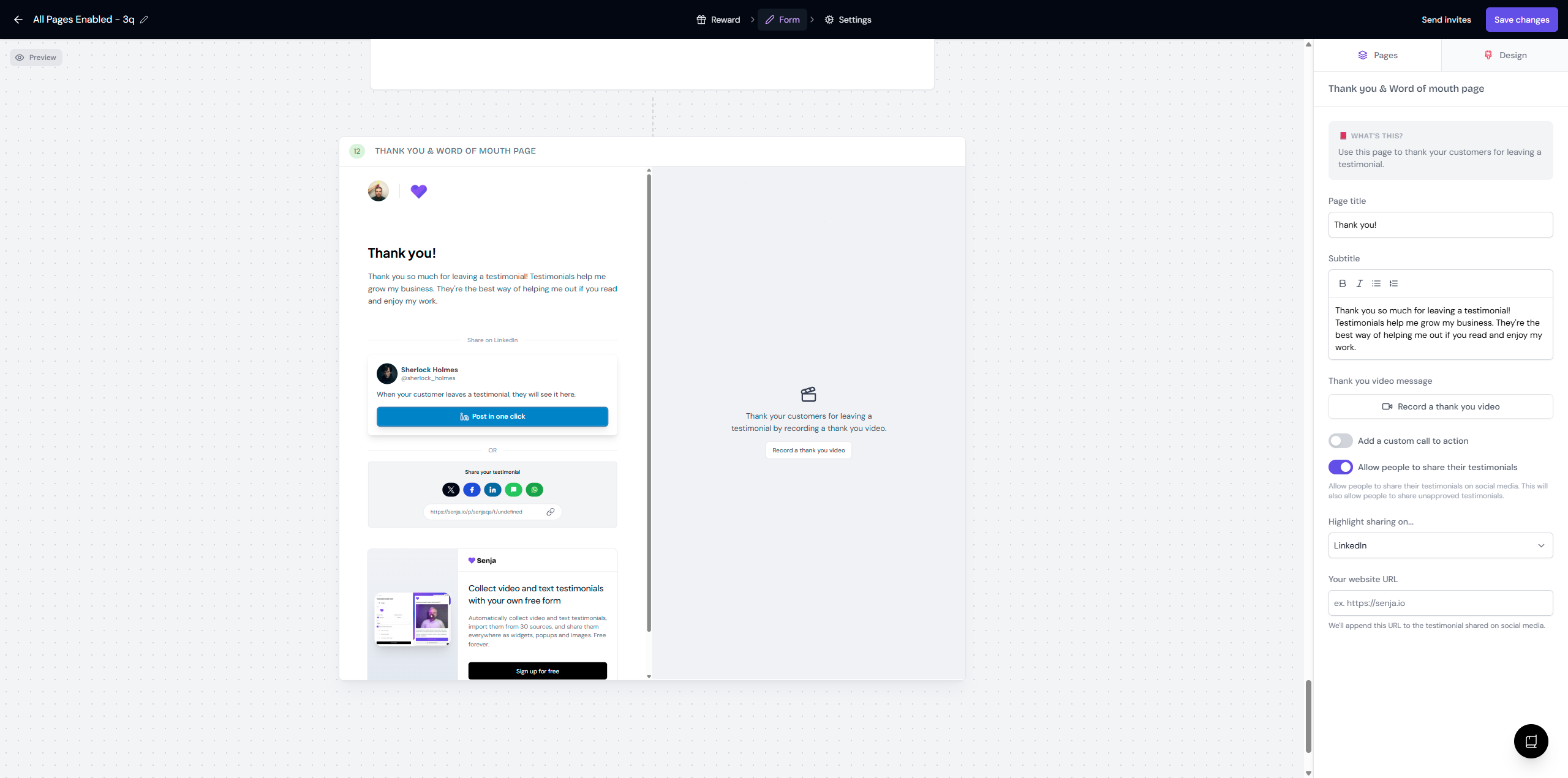
Record a video walkthrough on How to fill this form - or ask for help from our Support team to create this video walkthrough for you
Misleading buttons
We found that some forms put Submit as the text of CTA button in the middle (or even the start) of the form, for example in the questions page.
When seeing and clicking Submit on an earlier page makes customers think they're already done. If your customer is not in 100% focus, they might just click Submit and then close the page, without noticing that there are more questions coming.
How to prevent it:
Only use Submit as the CTA on the very last page
Use Continue or Go to the next question on every page before that
Check before you contact our Support
Check your notification
Go to Project Settings → Notifications: https://app.senja.io/settings/notifications
If you turn New testimonial notifications on, you will receive an email every time someone submit a testimonial on your form
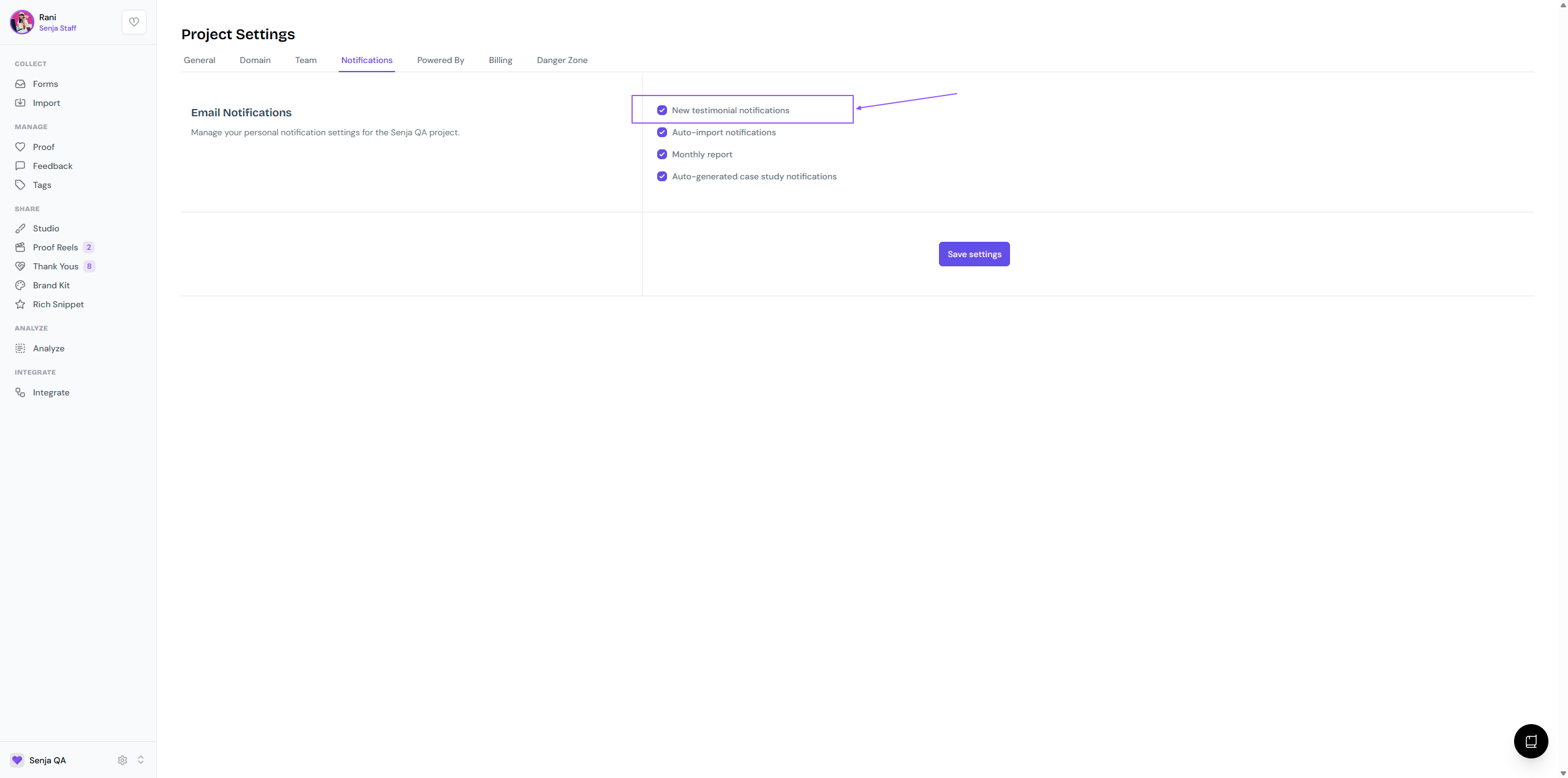
If your customer mentioned that they submit a form response, but there's no notification coming your way, it means that they have not completed the form
Track submission status
The most reliable way to know whether a customer actually completed your form is to send it as a form invite rather than a plain link. Form invites let you track status per customer.
📑 Read more: How do I use form invites?
When you share your form using Invites, the status is updated in real time in your form's Invites history.
Go to your Forms page: https://app.senja.io/forms
Click Invites on the form that you want to check
Any status other than Collected means that the customer has not completed the form
Reconfirm the submissions to your customer
If you set the notification off, or not sending the form using Invites, there's no visible marker to track the submission.
Go to your Forms page: https://app.senja.io/forms
Click ⚙️ and choose Edit
In the Form tab, scroll down to Thank you & word of mouth page
Take a screenshot of that page and send it to your customer, "Did you see this page when you submitted your responses?"
If your customer says "No," they have not completed the form
None of that rings a bell?
If your customer confirms they reached the end of the form and it's still not showing up, this may be a genuine bug.
Contact Senja Support team so we can investigate, with these information:
Your customer name
The approximate date/time of them submitting the testimonial
A screenshot or screen recording of what they experienced