
How do my customers subscribe back to Senja emails?
There might be some cases where your customer unsubscribe to the emails you sent from Senja: form invite email, form confirmation email, or thank-yous email. If they want to resubscribe to those emails, you can find the steps to do it in this article.
This is applicable to any Senja plans (Free, Starter, and Pro).
How unsubscribe works
When a customer unsubscribe to emails from your Senja project:
They will be removed from any communication from your Senja project
This is not limited to the thank-yous email only, or the form invite email only
They will have to resubscribe to be able to receive any email from your Senja project
How to resubscribe
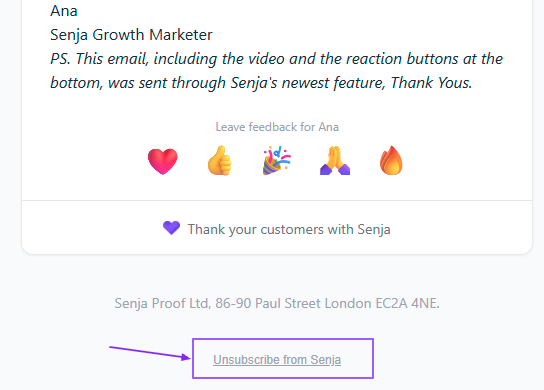
Open any past email they received from your Senja project
Click the Unsubscribe from Senja button
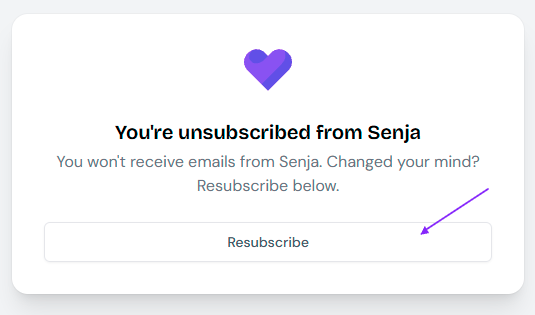
If they are unsubscribed, they will see this - simply click Resubscribe to be included back in the loop
They are still subscribed but my email doesn't come through
In a case where:
You send an email to a customer
They say they are not receiving any email
You ask them to do the resubscribe steps above
They see this screen
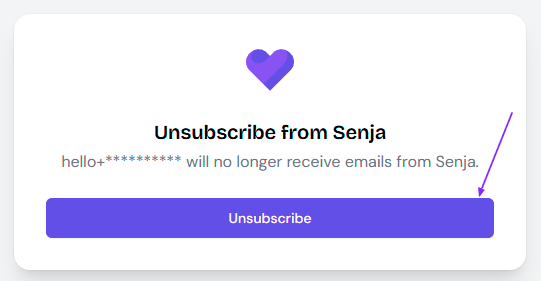
When you see that screen, with Unsubscribe button:
Your customer is still subscribed to your emails from Senja project
Ask your customer to search for your email in Spam/Junk/Promotion folder