
REST API
Senja's REST API lets you list, create, and work with testimonials in your project. Use it when you want to build your own integration or automate a workflow that Senja does not support natively.
This is applicable to any Senja plans (Free, Starter, and Pro).
Getting started
Senja's API uses REST, JSON responses, and standard HTTP methods.
Base URL
https://api.senja.io/v1Authentication
Find your API key in Automate in your Senja dashboard
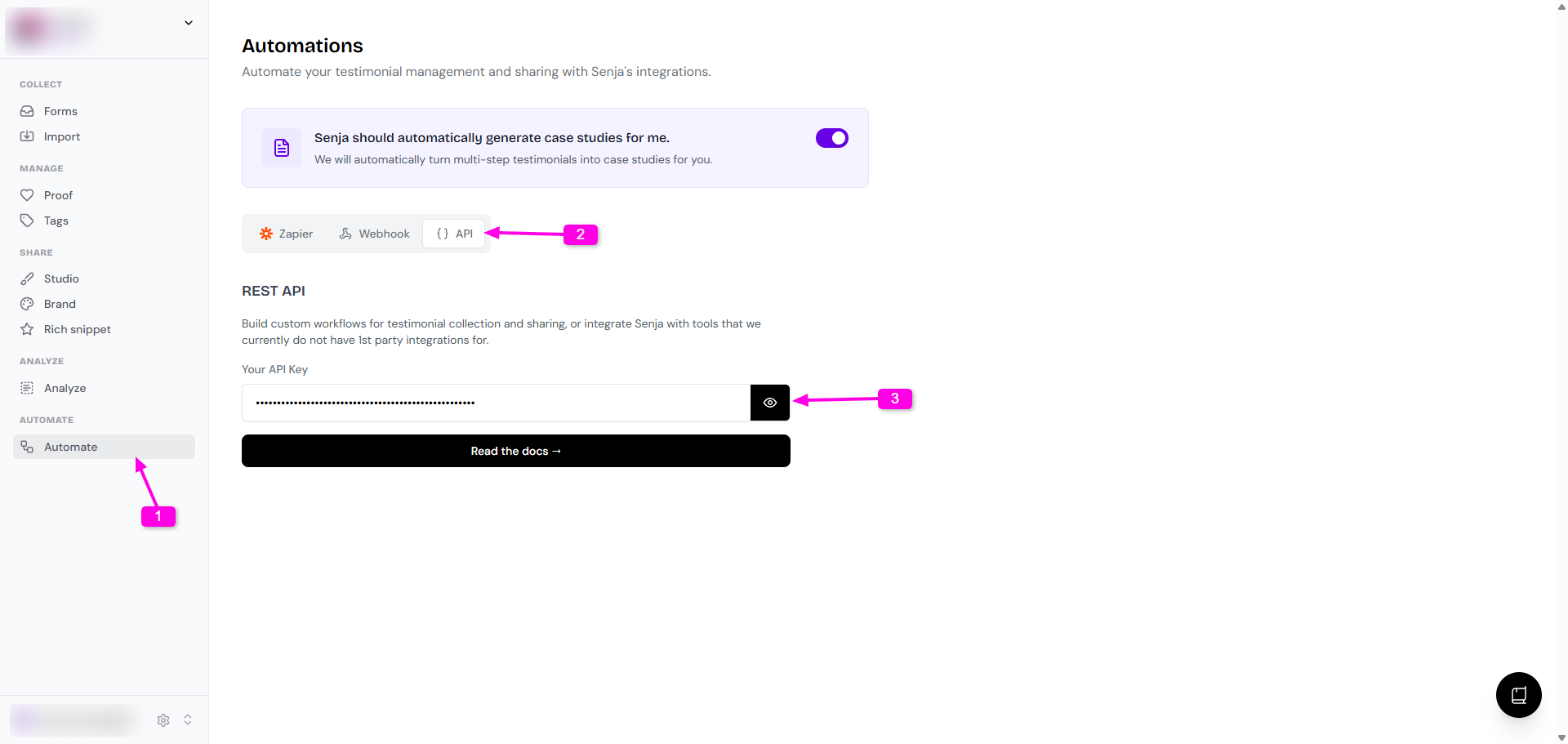
To authenticate your requests, pass the newly created key as the
Authorizationheadercurl "https://api.senja.io/v1/testimonials" \ -H "Content-Type: application/json" \ -H "Authorization: Bearer <Replace this with your API Key>"
If your API key is exposed, rotate it right away. This is useful if you accidentally show it during a live stream, screen share, or in a public code sample.
Go to Automate, press Regenerate API Key, then update every app or script that uses the old one. The old key will stop working in a few minutes.
Only users with the Admin or Owner role can regenerate an API key.
Endpoints
GET /testimonialsreturns testimonials from your Senja projectPOST /testimonialscreates a testimonialGET /testimonials/[id]returns one testimonial by IDPATCH /testimonials/[id]updates a testimonial's approval status or tagsDELETE /testimonials/[id]permanently deletes a testimonialGET /linksreturns your links, including their IDsPOST /invitessends testimonial invites to a list of people
List testimonials in your Senja project
Use
GET /testimonialsto return testimonials from your projectYou can filter by
tags,type,rating, andintegrationUse
queryfor full-text search across testimonial text, title, customer name, customer email, and customer taglineBy default, results are sorted by
datein descending orderYou can also sort by
ratingand change the order toascordesc
Example request
curl "https://api.senja.io/v1/testimonials" \
  -H "Authorization: Bearer API_KEY"
Query parameters
Parameter | Possible options | Default | Description |
|
|
| Sort by date or rating |
|
|
| Return oldest or newest results first |
|
|
| Return approved or unapproved testimonials |
|
|
| Return testimonials with a specific rating |
|
|
| Return text or video testimonials |
| Integration |
| Return testimonials from one integration |
|
|
| Return testimonials that match any of the given tag names |
|
|
| Full-text search across testimonial text, title, customer name, customer email, and customer tagline |
| ISO 639 language code |
| Return testimonials in a language or with a translation in that language |
|
|
| Limit the number of testimonials returned |
|
|
| Paginate through results |
In the GET /testimonials response, total is the number of results returned on the current page, not a global count. To fetch everything, keep paginating until total is lower than your limit.
Working with dates?
Some providers do not return exact review dates
For the recommended approach, see Handling review dates and the API
Example: find 2-star reviews
curl "https://api.senja.io/v1/testimonials?rating=2" \
  -H "Authorization: Bearer API_KEY"
Response fields
rewardis the reward stringtranslationsis an array of translation objects, each with alangfieldcreated_atis the creation timestampvideo_urlis the highest quality MP4 URL for video testimonialsvideocontains video metadata, includingduration,aspect_ratio,mp4_urls,hls_url, andtranscriptas a stringlinkscontains URLs for the testimonial, includingsenjafor the dashboard URL andpublicfor the shareable URL
{
  "total": 1,
  "testimonials": [
    {
      "id": "a1b2c3d4-...",
      "type": "text",
      "integration": "google",
      "title": "Great product",
      "text": "Senja makes it so easy to collect and share testimonials.",
      "rating": 5,
      "media": [],
      "url": "https://google.com/maps/reviews/...",
      "date": "2026-04-01T12:00:00.000Z",
      "approved": true,
      "project_id": "b2c3d4e5-...",
      "form_id": null,
      "thumbnail_url": null,
      "customer_name": "Jane Smith",
      "customer_email": "[email protected]",
      "customer_avatar": "https://ik.imagekit.io/senja/...",
      "customer_company": "Acme Inc",
      "customer_company_logo": null,
      "customer_tagline": "Head of Marketing",
      "customer_url": "https://example.com",
      "reward": null,
      "translations": [],
      "created_at": "2026-04-01T12:00:00.000Z",
      "tags": ["featured"],
      "video_url": null,
      "video": null,
      "links": {
        "senja": "https://app.senja.io/?project=b2c3d4e5-...&testimonial=a1b2c3d4-...",
        "public": "https://senja.io/p/acme/t/a1b2c3d4-..."
      }
    }
  ]
}
Update a testimonial
Use
PATCH /testimonials/[id]to update a testimonial's approval status or tagsAt least one of
approved,add_tags, orremove_tagsis requiredOnly these fields can be changed with the API. To edit text, rating, or customer details, use the Senja dashboard
JSON body parameters
Parameter | Type | Required | Description |
| boolean | No | Set approval status. |
|
| No | Tag names to add. Tags are created automatically if they do not already exist |
|
| No | Tag names to remove |
Example request
curl -X PATCH "https://api.senja.io/v1/testimonials/[id]" \
  -H "Authorization: Bearer API_KEY" \
  -H "Content-Type: application/json" \
  -d '{
    "approved": true,
    "add_tags": ["featured"],
    "remove_tags": ["needs-review"]
  }'
The API returns the updated testimonial.
Delete a testimonial
Use
DELETE /testimonials/[id]to permanently delete a testimonialThis action is irreversible
Example request
curl -X DELETE "https://api.senja.io/v1/testimonials/[id]" \
  -H "Authorization: Bearer API_KEY"
Example response
{
  "message": "Testimonial deleted"
}
Create a testimonial
Use
POST /testimonialsto create a testimonial in your projectThe response returns a confirmation message and the new testimonial ID
Example request
curl -X POST "https://api.senja.io/v1/testimonials" \
  -H "Authorization: Bearer API_KEY" \
  -H "Content-Type: application/json" \
  -d '{
    "type": "text",
    "customer_name": "Jane Doe",
    "customer_email": "[email protected]",
    "customer_company": "Acme Corp",
    "customer_tagline": "Head of Product",
    "title": "Absolute game-changer",
    "text": "This is a fake testimonial for demo purposes. The product saved us 10 hours a week and made our team mass unboxers.",
    "rating": 5,
    "approved": false,
    "tags": ["demo", "fake"]
  }'
Example response
{
  "message": "Testimonial created",
  "id": "a1b2c3d4-..."
}
JSON body parameters
Parameter | Type | Required | Description |
| string | Yes |
|
| string | No | Testimonial title |
| string | No | Testimonial text |
| number | No | Rating value, usually 1 to 5 |
| string | No | Source URL for the testimonial |
| string | No | ISO 8601 date |
| boolean | No | Approval status |
| string | No | Thumbnail image URL |
| string | No | Form ID linked to the testimonial |
| string | Yes | Customer name |
| string | No | Customer email address |
| string | No | Customer avatar URL |
| string | No | Customer company logo URL |
| string | No | Customer company name |
| string | No | Customer tagline |
| string | No | Customer username |
| string | No | Customer website or profile URL |
| Integration | No | Source integration value |
|
| No | Tag names |
| string | No | Video URL for video testimonials |
| array | No | Attached media items |
| string | No | Alt text for the media |
| string | No | Media URL |
|
| No | Media type |
Get links from the API
Use
GET /linkswhen you need the shareable URL for one of your Senja links, such as a widget URL you want to display somewhere elseThe response also includes each link's
id, so you can use it as a programmatic reference when neededThe response is grouped by link type
If you need a testimonial ID for a shareable testimonial URL, use
GET /testimonialsorGET /testimonials/[id]
Example request
curl "https://api.senja.io/v1/links" \
  -H "Authorization: Bearer API_KEY"
Example response
{
  "case_studies": [
    {
      "id": "a1b2c3d4-...",
      "name": "...",
      "url": "https://senja.io/p/.../case-studies/a1b2c3d4-..."
    }
  ],
  "forms": [
    {
      "id": "b2c3d4e5-...",
      "name": "...",
      "url": "https://senja.io/p/.../r/..."
    }
  ],
  "quick_links": [
    {
      "id": "c3d4e5f6-...",
      "name": "...",
      "url": "https://senja.io/p/.../s/..."
    }
  ],
  "sizzle_reels": [
    {
      "id": "d4e5f6a7-...",
      "name": "...",
      "url": "https://senja.io/p/.../mv/d4e5f6a7-..."
    }
  ],
  "walls_of_love": [
    {
      "id": "e5f6a7b8-...",
      "name": "...",
      "url": "https://senja.io/p/.../..."
    }
  ],
  "widgets": [
    {
      "id": "f6a7b8c9-...",
      "name": "...",
      "type": "...",
      "url": "https://widget.senja.io/widget/f6a7b8c9-..."
    }
  ]
}
Send form invite emails to your customers
Sends invite emails for one of your forms
The email content and follow-up sequence come from that form's email sequence settings in your dashboard
Use
GET /linksto get theform_id
Example request
curl -X POST https://api.senja.io/v1/invites \
  -H "Authorization: Bearer <API_KEY>" \
  -H "Content-Type: application/json" \
  -d '{
    "form_id": "a1b2c3d4-...",
    "recipients": [
      { "email": "[email protected]", "name": "Olly Meakings" },
      { "email": "[email protected]" }
    ]
  }'
name is optional. form_id comes from GET /links -> forms[].id
Example response
{
  "sent": 1,
  "skipped": [
    {
      "email": "[email protected]",
      "reason": "already_invited"
    }
  ]
}
Shareable testimonial URL
You can build a direct URL for a testimonial with your project permalink and the testimonial ID
https://senja.io/p/[permalink]/t/[testimonial_id]
Replace
[permalink]with your project permalink and[testimonial_id]with the testimonial ID you want to shareTo retrieve testimonial IDs, use
GET /testimonials
Supported integrations
enum Integration {
  TWITTER = 'twitter',
  PRODUCT_HUNT = 'product_hunt',
  GOOGLE = 'google',
  FACEBOOK = 'facebook',
  REDDIT = 'reddit',
  CAPTERRA = 'capterra',
  G2 = 'g2',
  LINKEDIN = 'linkedin',
  APP_STORE = 'app_store',
  TRUSTPILOT = 'trustpilot',
  SHOPIFY = 'shopify',
  PLAY_STORE = 'play_store',
  YELP = 'yelp',
  SLACK = 'slack',
  DISCORD = 'discord',
  APPLE_PODCASTS = 'apple_podcasts',
  TELEGRAM = 'telegram',
  WHATSAPP = 'whatsapp',
  INSTAGRAM = 'instagram',
  YOUTUBE = 'youtube',
  TIKTOK = 'tiktok',
  APPSUMO = 'appsumo',
  AMAZON = 'amazon',
  ZILLOW = 'zillow',
  UDEMY = 'udemy',
  CHROME_WEB_STORE = 'chrome_web_store',
  AIRBNB = 'airbnb',
  SKILLSHARE = 'skillshare',
  REALTOR = 'realtor',
  SOURCEFORGE = 'sourceforge',
  WHOP = 'whop',
  WORDPRESS = 'wordpress',
  FIVERR = 'fiverr',
  HOMESTARS = 'homestars',
  WEB_PAGE = 'web_page',
}