
What can I automate in Senja?
Set it up once, and Senja takes it from there. Here's everything you can automate in Senja, from thanking new customers to asking for testimonials at the right moment, and where to set each one up.
Automations are available on all Senja plans: Free, Starter and Pro. Some integrations need a paid plan, so check each guide below.
Where to find your automations
What you want to automate | Where to set it up | Guide |
|---|---|---|
Thank every new customer | Automate in the left sidebar | See below |
Ask customers for a testimonial | Your form → Invites → Automate | |
Get notified, post on socials, send gifts, or export to your CRM | Settings → Integrations | See below |
Connect Senja to 7,000+ other apps | Zapier |
Thank every new customer automatically
When someone buys from you, Senja can send them a thank you from you, automatically.
In the left sidebar, click Automate: https://app.senja.io/automate
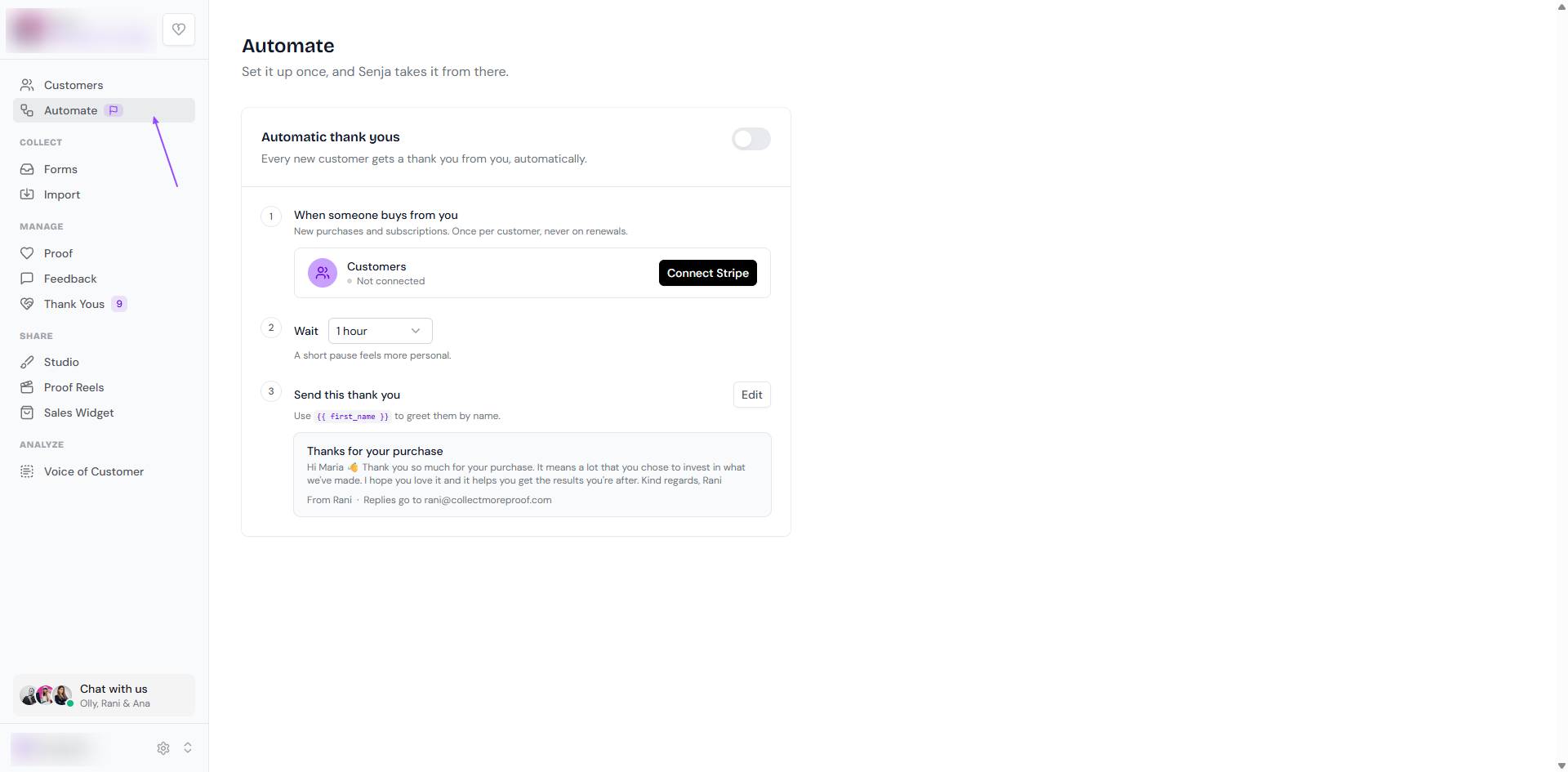
Turn on Automatic thank yous
When someone buys from you: click Connect Stripe. Thank yous go out for new purchases and subscriptions, once per customer and never on renewals. See How to connect Stripe to Senja
Wait: choose how long to wait before the thank you is sent, like 1 hour. A short pause feels more personal
Send this thank you: click Edit to write your message. Use
{{ first_name }}to greet each customer by name
To send a thank you by hand, or to see who you've thanked, see How do I send thank you notes from the Thank Yous page?
Ask for testimonials automatically
Each form has its own automations, so invites go out from the right form at the right moment.
Go to your Forms page: https://app.senja.io/forms
Choose your form, click Invites, and go to the Automate tab
Pick a platform, like Stripe (built in) or Kit, Help Scout, Intercom, Shopify and Podia (with Zapier), and click Connect
Invites show up in Senja, and Senja sends the follow-up reminders from your form's Email sequence tab. See How to send testimonial requests automatically.
Integrations in Settings
Go to Settings → Integrations (https://app.senja.io/settings/integrate) to connect ready-made automations:
Notifications: get a Slack, Microsoft Teams, Discord or Telegram message when you receive a new testimonial
Share testimonials on socials: draft a post in Typefully, Buffer or Hootsuite when you approve a testimonial
Send thank yous: send a $10 Tremendous gift card when you approve a testimonial
Export testimonials: send your testimonials to your CRM
Backup: store your testimonials in Google Drive
Sending a gift? Trigger it when a testimonial is approved, not when it's received, so you can check the testimonial first.
More ideas with Zapier
With Zapier, you can connect Senja to 7,000+ apps. Some popular ideas:
🎁 Email a discount code when someone submits a video testimonial
📞 Send a testimonial request 5 hours after a Calendly call
⬇️ Import testimonials from Airtable or Notion databases to Senja
🎥 Save video testimonial backups to Dropbox automatically
🙏 Send handwritten thank-you notes when testimonials arrive
🗒️ Trigger testimonial requests when you tag contacts in your CRM
See How to automate testimonials with Zapier to set them up.
Can I change when automated emails are sent?
Thank yous: yes, use the Wait setting on the Automate page
Testimonial invites and reminders: set them up in your form's Email sequence tab, see How do I use form invites?
Building your own automation? Use the Senja API, see How to regenerate API key.