
How do I claim my discount?
Apply discount codes during Stripe checkout to get promotional pricing on your Senja subscription. This covers nonprofit discounts (30% off for life) and promotional codes.
Available discounts: Nonprofit/NGO/Charity (30% off for life - learn more) and promotional codes from partners/campaigns.
Apply your code BEFORE completing payment on the Stripe checkout page. You cannot retroactively apply discount codes to completed transactions
Apply a discount code during checkout
Start the upgrade process
Go to Senja's pricing page or your upgrade page
Select your plan (Starter or Pro)
Click the button to start your subscription
You'll be redirected to the Stripe checkout page
Apply your code on Stripe checkout
On the Stripe checkout page, click Add promotion code (below the order summary or price details)
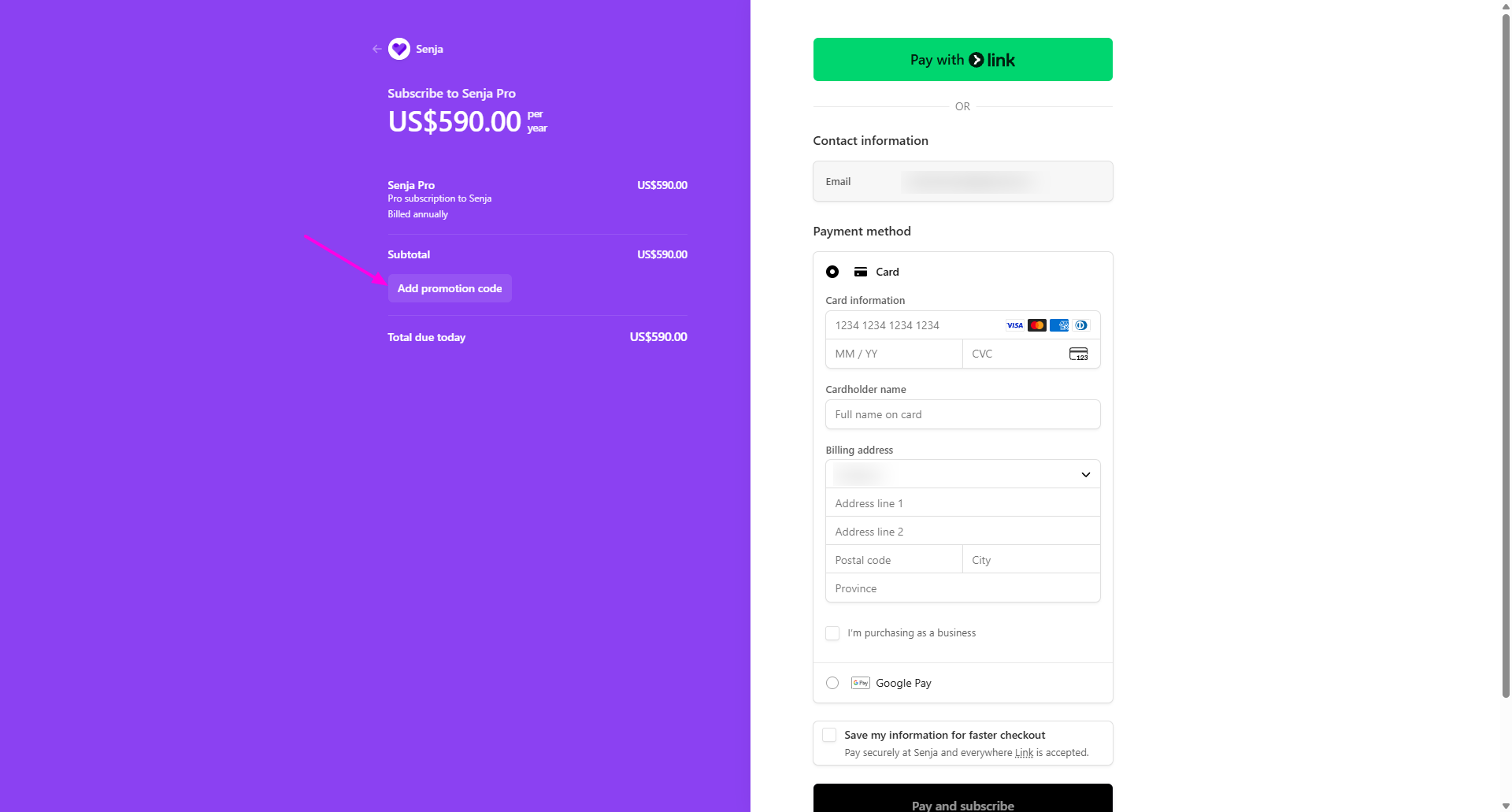
Enter your discount code in the field that appears
Click Apply
The promo code field isn't visible by default. Click Add promotion code to reveal it
Verify the discount before paying
Before entering payment details, confirm:
The total amount decreased and shows your discounted price
Your promo code appears with a confirmation message like Discount applied
The discount percentage matches what was offered (e.g., 30% off, $1 for 2 months)
If the price hasn't changed or you don't see confirmation, stop and contact Support before completing purchase.
Complete payment
Enter your payment card information
Review the final discounted price
Complete your purchase
You'll receive a confirmation email with your discounted subscription details
Submit documentation for verification
If you prefer to verify your status before purchasing, or if you're having issues with the discount code, submit documentation to our team.
Prepare your documentation
For nonprofits, charities, and NGOs:
501(c)(3) determination letter
Employer Identification Number (EIN)
Registered charity number
Any formal document confirming nonprofit status
For promotional codes:
Email or proof mentioning your promotional code from Senja
Submit and receive your discount
Email your documentation
Include your organization/company name, which plan you want, and any questions
We'll review within 1-2 business days
We'll send you a personalized code or apply the discount directly to your account
If you receive a code, apply it during Stripe checkout using the steps above
If we apply it directly, upgrade your account and the discount appears automatically
Troubleshooting
Can't find the Add promotion code link
Look in the payment summary section on the Stripe checkout page
Check below the price details or order total
The text may say Add promotion code or Add promo code
Try refreshing the page or restarting the checkout process
Discount code isn't working
Check spelling - Promo codes are case-sensitive
Verify validity - Some codes expire or only work for specific plans
Confirm plan compatibility - Some codes only work with annual plans or specific tiers
One code per transaction - You can only apply one code at a time
Still not working? Contact Support with the code you're trying to use
Completed payment without applying the code
Discount codes cannot be applied retroactively, but our support team may be able to help:
Contact Support immediately
Include your promo code and transaction details
We'll review and may issue a partial refund or apply the discount to future billing cycles
Subscription activated before applying the code
If your subscription activated before you could apply the promo code:
Cancel your subscription immediately to avoid charges
Wait for cancellation to process (usually within 24 hours)
Restart the upgrade process and apply your code before completing payment
Already charged? Contact Support for a refund
Payment issues
If your payment fails during checkout, try re-entering your card details or contact Support.
Changing your plan
Your discount remains active when you change your Senja plan.
Need help?
Contact Support if you need assistance claiming your discount or applying promotional codes.